
L Shaped Couch with USB Ports: Complete Buying Guide
Stay charged, stay comfortable. Learn how built-in USB charging transforms your L shaped sectional into a modern living room hub — and how to choose the right model for your space.
View Recommended ModelsThe L shaped couch with USB ports is one of the most practical upgrades in modern living room furniture. It combines the expansive seating of a sectional with the everyday convenience of built-in charging, so you can power a phone, tablet, or laptop without leaving your seat. For households that live, work, and relax in the same room, this combination solves a real daily friction point.
This guide is written for shoppers who already know they want an L shaped sectional with charging capability and need trustworthy detail before committing. We cover how USB ports work on couches, what specifications actually matter, how to match chaise orientation to your room, and which features separate entry-level models from premium and luxury tiers. By the end, you will have a clear checklist for choosing a model that fits your layout and lifestyle.
Why Choose an L Shaped Couch with USB Ports?
An L shaped sectional already delivers generous seating and a natural room divider. Adding USB ports turns it into a charging station that keeps devices powered during movie nights, work-from-couch sessions, and long gaming marathons. The convenience is subtle but habit-forming: no more hunting for wall outlets or stretching cables across the floor.
Beyond convenience, built-in charging supports a tidier living room. When charging lives inside the couch, you reduce visible cable clutter and the temptation to drape cords over armrests. For families and shared households, dedicated ports also reduce outlet competition — a small design decision with an outsized daily impact.
Key Features to Evaluate Before You Buy
Port Type & Output
Check whether the couch offers USB-A, USB-C, or both. USB-C with higher power output is better for modern phones, tablets, and lightweight laptops. Confirm the output rating so you know whether a port will fast-charge or simply maintain a battery.
Port Placement
Ports are typically located on the side of the armrest, inside a console, or near the chaise. Choose a placement that matches how you sit — for example, a console with ports suits reclining seats, while armrest ports work well for upright seating.
Power Source & Cord Length
Most models use a standard wall adapter with an included cord. Measure the distance from your preferred outlet to the couch and confirm the cord reaches. Hidden cable channels are a premium feature that keeps wiring out of sight.
Frame & Upholstery
USB electronics are only as reliable as the couch around them. Look for solid hardwood or reinforced frames and durable upholstery such as performance fabric or full-grain leather. These determine how long the entire piece — electronics included — will serve you.
Chaise Orientation
Left-arm and right-arm chaise options let the L shape open toward your room's focal point. Measure your space and map the walkway before choosing, since reversing orientation after delivery is usually not possible.
Seat Depth & Comfort
Deeper seats suit lounging and napping; shallower seats suit upright conversation. If you plan to work from the couch, prioritize supportive cushioning and a backrest height that keeps a laptop at a comfortable angle.
How USB Charging Works on a Couch
Built-in USB ports on a couch are powered by a small adapter that plugs into a standard wall outlet. The adapter converts household power into the lower voltage your devices need, and the ports are wired through the couch frame to reach the armrest, console, or chaise. Because the system is self-contained, no special electrical work is required in most cases.
Quality varies by tier. Entry-level models often provide basic USB-A ports with modest output, suitable for maintaining a phone battery. Mid-range and premium models increasingly include USB-C ports, higher output for tablets, and sometimes wireless charging pads built into the armrest. Luxury and commercial-grade models may add surge protection, concealed cable routing, and modular charging modules that can be serviced or replaced independently.
- Entry-level: USB-A ports, standard output, basic adapter.
- Mid-range: USB-A and USB-C combination, higher output, tidier cable routing.
- Premium: Fast-charging USB-C, wireless charging pads, hidden channels.
- Luxury / commercial-grade: Modular charging modules, surge protection, serviceable electronics.
Feature Comparison by Tier
Use this table to set expectations before you shop. It compares typical feature sets across market tiers without referencing specific figures, so the guidance stays useful over time.
| Tier | Charging Features | Frame & Upholstery | Best For |
|---|---|---|---|
| Entry-level | USB-A ports, standard output, basic adapter | Engineered wood frame, standard fabric | Occasional charging, first sectional |
| Mid-range | USB-A + USB-C, higher output, cable channel | Hardwood frame, performance fabric options | Daily phone and tablet charging |
| Premium | Fast-charging USB-C, wireless pad, hidden routing | Solid hardwood, full-grain leather or premium fabric | Work-from-couch, heavy daily use |
| Luxury / commercial-grade | Modular charging modules, surge protection | Reinforced frame, top-tier upholstery | Long-term investment, high-traffic homes |
Matching the L Shape to Your Room
The L shape is versatile, but orientation matters. A chaise on the left or right changes how the couch opens toward a TV, fireplace, or window. Before ordering, sketch your room and mark the focal point, then choose the orientation that lets the chaise frame the space rather than block it.
For compact rooms, a smaller L shaped model with USB ports keeps charging within reach without overwhelming the floor plan. Our guide to an L shaped couch for small spaces covers measurement strategies and compact layouts. If you are designing around a larger sectional, our article on designing a living room with a sectional explains traffic flow and focal-point placement in more depth.
Also consider how the couch interacts with adjacent furniture. A chaise that extends into a walkway creates a pinch point; a chaise that anchors a corner frees up circulation. If you plan to add a recliner, our guide to an L shaped couch and recliner set shows how to coordinate the two without crowding the room.
Planning Power and Cable Management
USB ports are only convenient if the couch can reach an outlet. Measure the distance from your preferred wall outlet to the couch's power adapter location, then compare it with the included cord length. If the distance is tight, consider a behind-couch power solution. A behind-couch table with outlet adds both a charging point and a surface for lamps or decor.
Cable management is the difference between a clean setup and a tangle. Look for models with hidden channels or a console that conceals wiring. Keep charging cables short and route them along the frame rather than across seat cushions. If you frequently charge multiple devices, a couch with a built-in console or cup holder section can double as an organized charging hub.
Durability and Upholstery Considerations
Electronics are only one part of the purchase. The frame and upholstery determine how the couch holds up over years of daily use. Solid hardwood frames resist warping better than engineered wood, and reinforced joints reduce squeaks and sagging. For upholstery, performance fabric resists stains and spills, while full-grain leather develops a patina and is straightforward to maintain.
If you want a leather option, our leather sofas guide explains grades and care. For fabric, the same principles apply: tighter weaves resist pilling, and removable covers simplify cleaning. Whichever material you choose, confirm that the charging components are positioned away from high-spill zones such as the chaise end where drinks tend to land.
Safety and Electrical Standards
Built-in USB charging is safe when the couch meets relevant electrical safety standards. Look for certified adapters and properly insulated wiring, and avoid overloading ports with high-draw devices beyond their rating. Keep cables away from walkways and pet chewing zones, and unplug the adapter during extended absences if the manufacturer recommends it.
If the couch includes a reclining mechanism, confirm that the charging wiring is routed separately from moving parts. This prevents wear on cables over time. For households with children, choose models with covered or recessed ports to reduce the chance of tampering.
Recommended L Shaped Couches with USB Ports
⚠️ AFFILIATE DISCLOSURE: This website contains affiliate links. As an affiliate Associate, we earn from qualifying purchases. If you make a purchase through these links, we may receive a small commission at no additional cost to you. Read our full affiliate policy.

WEUP 86" Modular Sectional Sleeper Sofa with Pull Out Bed, 3 Seat Plush Corduroy L Shaped Couch with USB Ports|Cup Holders|Side Table|Storage Chaise Armrests, Tool Free Assembly, Beige
Check price on Amazon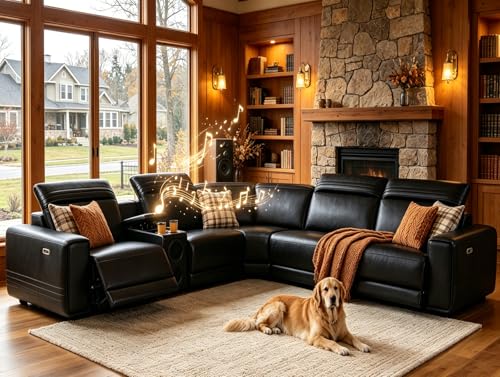
Leather Power Reclining Sectional Sofa with Bass Speakers for Living Room | L-Shaped Recliner Couch with USB Ports, Cup Holders and Storage, Living Room Furniture Set for Home, Office & Apartment
Check price on Amazon
Vipbear 111" Modular Sectional Sleeper Sofa with Pull Out Bed, 7 Seat Chenille L Shaped Couch with Storage Chaise|USB Ports|Cup Holders|Side Table|LED Light, Tool Free Assembly, Grey
Check price on Amazon
WEUP 111" Modular Sectional Sleeper Sofa with Pull Out Bed, 7 Seat Chenille L Shaped Couch with Storage Ottoman|USB Ports|Cup Holders|Side Table|LED Light, Tool Free Assembly, Grey
Check price on Amazon
KCGKCG 93" L Shaped Sleeper Sofa Bed, Pull Out Sectional Couch with Storage Chaise/Reclining Backrest, Sectional Couches for Living Room with USB Port, Foldable Table, Cup Holder, Side Pocket, Black
Check price on Amazon
Trygoal 111" Oversized Boneless Modular L-Shaped Couch with Cup Holders & USB Charging Ports, 3 Seat Cloud Sectional Couch with Storage Ottoman, Convertible Sofa for Apartment Living Room (Jet Black)
Check price on Amazon
EYATZO L-Shaped Sectional Sleeper Sofa with Pull Out Bed, Black | Plush Corduroy Modular Couch with Storage, USB Charging, Cup Holders – Cozy Cloud Couches for Living Room, Easy Assembly
Check price on Amazon
Kuroyama 120" Large Sectional Couches for Living Room, 7 Seater Corner Sofa | Chenille V-Shaped Sofa with Storage Ottoman & USB Ports, Deep Seat L Shaped Sectional Couch for Living Room, Black
Check price on AmazonFinal Buying Checklist
- Confirm port type (USB-A, USB-C) and output rating match your devices.
- Verify port placement suits how you sit and charge.
- Measure outlet distance against the included cord length.
- Choose left-arm or right-arm chaise based on room layout and focal point.
- Check frame material and upholstery durability for your household.
- Review safety certifications and cable routing around moving parts.
- Consider dual-purpose features if you host guests or work from the couch.
If you are still exploring configurations, compare this guide with our overview of L shaped couches for living rooms to see how charging models fit into broader layout planning.
Frequently Asked Questions
What should I look for in an L shaped couch with USB ports?
Focus on port type and output, port placement, power cord length, frame construction, and upholstery durability. Check whether ports are USB-A, USB-C, or both, and confirm the seat depth and chaise orientation fit your room.
Are USB ports on a couch safe to use?
Yes, when the couch meets relevant electrical safety standards and the wiring is properly insulated. Look for certified components, avoid overloading ports, and keep cables away from high-traffic areas.
Do USB charging couches require special installation?
Most models plug into a standard wall outlet with an included adapter or power cord. Some premium models offer wireless charging pads or hidden cable channels, but no special electrical work is typically required.
Ready to Choose Your Charging Sectional?
Review the recommended models above, then compare features against your room measurements and device needs.
Explore Recommended Models