
Ultimate Gaming Setup Guide
From ergonomic chairs to high-refresh monitors — build the battlestation you deserve. Expert tips, gear comparisons, and layout ideas for every budget.
SHOP TOP GAMING GEAR🎮 Level up your comfort and performance. A well-planned gaming setup isn't just about aesthetics — it directly impacts your posture, reaction time, and overall enjoyment. Whether you're a casual player or a competitive streamer, the right chair, desk, and accessories make all the difference.
Top Gaming Gear Picks
⚠️ AFFILIATE DISCLOSURE: This website contains affiliate links. As an affiliate Associate, we earn from qualifying purchases. If you make a purchase through these links, we may receive a small commission at no additional cost to you. Read our full affiliate policy.

YAWYORE Gaming PC, AMD Ryzen 7 5700X, GeForce RTX 5060 Desktop Computer

Dell Gaming OptiPlex Desktop RGB Computer PC, Intel Core i7, GeForce GT 1030 2GB GDDR5, 16GB RAM, 512GB SSD, 24 Inch HDMI Monitor, Keyboard Mouse and Headset, WiFi, Windows 11 Pro (Renewed)

msi Codex Z2 Gaming Desktop, AMD R7-8700F, RTX 5070, 32GB DDR5, 2TB SSD

Gaming Keyboard and Mouse and Mouse pad and Gaming Headset, Wired LED RGB Backlight Bundle for PC Gamers and Xbox and PS4 Users - 4 in 1 Edition Hornet RX-250
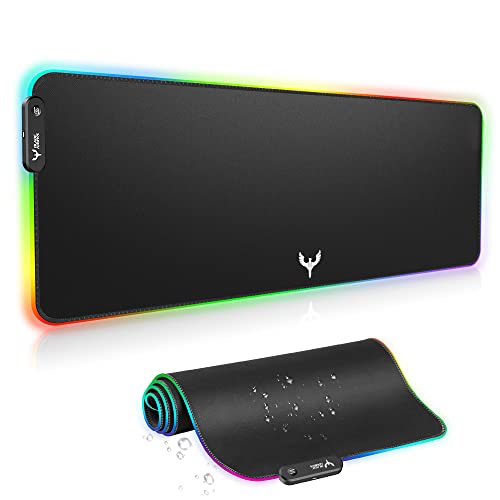
BladeHawks RGB Gaming Mouse Pad Extra Large Extended 31.5x12 Inch-Black

DIGSOM Gaming Mouse Pad, Black with White Topographic Line, 31.5x11.8in

Jgstkcity Desk Clamp Power Strip USB C,40W Total Fast Charging Station,4 PD 20W USB C Ports,Desk Edge Mount Surge Protector,5 Outlets,Fit 1.96" Tabletop Edge,ETL Listed

TONOR Gaming Microphone Set with Boom Arm, Vocal Condenser Microphone for Content Creators, USB Mic for PC with Stand, RGB, Tap Mute, Gain Control, Gaming Equipemnt, Twitch, Streaming, TC310+
Essential Gaming Setup Components
🪑 Gaming Chair
Ergonomic support for long sessions. Look for adjustable lumbar, 4D armrests, and breathable materials. Top picks from reclining sofas for comfort inspiration.
$300 – $600🖥️ Gaming Desk
Sturdy, spacious, and height-adjustable. A large surface supports dual monitors and cable management. Consider small-space layout tips for compact rooms.
$200 – $500🖱️ Monitor & Peripherals
144Hz+ refresh rate, 1ms response, and G-Sync/FreeSync. Mechanical keyboards and precision mice complete the setup.
$250 – $800💡 RGB & Acoustics
Smart lighting and sound panels elevate immersion. Sync RGB with your gameplay for the full experience.
$50 – $200How to Choose Your Gaming Setup
1. Start with the chair. Your spine will thank you. Look for a chair with adjustable height, tilt tension, and lumbar support. Many gamers also repurpose loveseats for a more relaxed console setup.
2. Desk size & shape. L-shaped or straight? Measure your space. For corner setups, check narrow-room layout ideas to maximize floor area.
3. Monitor placement. Eye level is key — the top of the screen should be at or slightly below eye level. Use measurement guide for perfect ergonomics.
4. Cable management & lighting. Keep it tidy with under-desk trays and velcro ties. Bias lighting behind the monitor reduces eye strain and adds style.
5. Audio & streaming. A good headset or speakers, a quality mic, and a webcam if you stream. Don't overlook acoustics — foam panels and diffusers improve sound clarity.
Ergonomics – Play Longer, Feel Better
Posture Checklist
- Feet flat on the floor (or footrest)
- Knees at 90°, hips slightly higher
- Elbows at 90°, wrists straight
- Monitor arm's length, top at eye level
Comfort Upgrades
- Memory foam seat cushion
- Lumbar roll or pillow
- Adjustable monitor arm
- Anti-fatigue mat for standing desks
For longer sessions, consider a reclining sofa or chaise lounge for a more laid-back console experience. These provide excellent back support and can double as a secondary seating area.
Gaming Room Layout & Lighting
Optimize your space – position your desk to avoid glare on the screen. Use window placement tips to reduce reflections. For ambient lighting, combine overhead lighting with accent lighting like LED strips behind the desk or monitor. Smart bulbs let you adjust color temperature based on the time of day — warm for casual gaming, cool for competitive focus.
If you're working with a smaller room, check out small-space layout strategies to fit a full setup without clutter. For open-plan areas, open floor plan ideas help define your gaming zone naturally.
Must-Have Gaming Accessories
🎧 Headset Stand
Keeps your headset accessible and adds a professional look. Some include USB hubs.
$20 – $60⌨️ Mechanical Keyboard
Linear, tactile, or clicky — choose switches that match your playstyle. RGB optional.
$80 – $200🖱️ Mouse Bungee
Eliminates cable drag for smooth flicks. A small but impactful upgrade.
$15 – $40💡 Ambient Lighting
Philips Hue or Govee strips sync with your screen for immersive glow.
$50 – $150Gaming Setup for Every Budget
💰 Entry (under $800)
- Basic ergonomic chair
- 60% mechanical keyboard
- 75Hz monitor
- RGB mousepad
Great for casual gamers and students.
⚡ Mid-Range ($800–$1,800)
- High-back gaming chair
- 144Hz IPS monitor
- Wireless mouse + mechanical
- Sound dampening panels
Sweet spot for performance and comfort.
🚀 Premium ($1,800+)
- Premium ergonomic chair
- 240Hz+ OLED monitor
- Custom mechanical keyboard
- Full room acoustics & RGB
For enthusiasts, streamers, and pros.
Ready to Build Your Dream Gaming Setup?
We've curated the best gaming chairs, desks, monitors, and accessories from top brands. Click below to browse our recommended picks and level up your gaming experience today.
SHOP GAMING GEAR NOWIf you're also interested in creating a home theater setup or a music listening area, many of the same principles apply — comfort, acoustics, and lighting are universal.